


1980s AI Photo Prompt ChatGPT: 10 Prompts for Retro 80s Photos
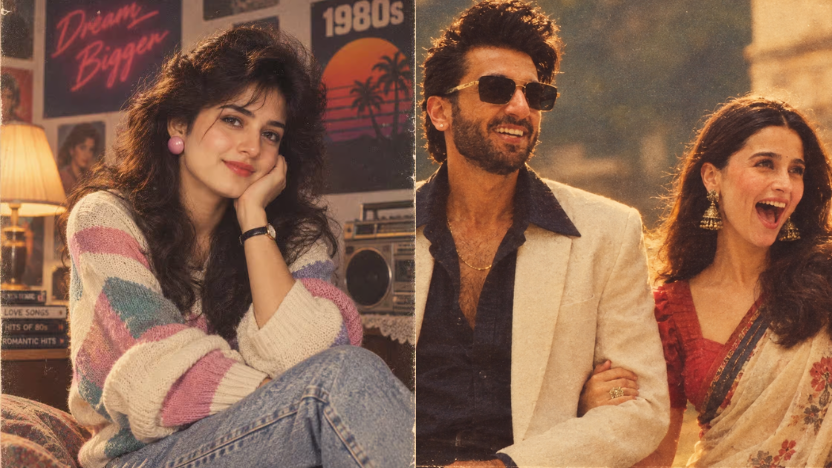
The 1980s AI photo trend is becoming popular on social media, with users transforming their modern pictures into nostalgic retro photographs. From vintage family albums and Bollywood-inspired...

The 1980s AI photo trend is becoming popular on social media, with users transforming their modern pictures into nostalgic retro photographs. From vintage family albums and Bollywood-inspired portraits to college pictures, wedding photos and old studio portraits, AI tools can recreate the fashion, hairstyles, lighting and photography style of the 1980s.
If you are searching for a 1980s AI photo prompt ChatGPT, you can upload a clear photo and ask ChatGPT to give it an authentic 80s look. A detailed photo editing 1980s AI photo prompt can change the clothing, hairstyle, background, accessories, colours and overall mood while keeping your face recognisable.
In this article, you will find 10 copy-paste 1980s photo prompts for ChatGPT, a short 80s look prompt, steps to create the trend, tips for realistic results and a Gemini AI photo prompt.
What Is the 1980s AI Photo Trend?
The 1980s AI photo trend uses artificial intelligence to transform a modern photograph into an image that looks as if it was captured during the 1980s.
Instead of applying only a vintage colour filter, AI photo editing can recreate several visual elements of the decade, including:
- 1980s hairstyles and haircuts
- Vintage clothing and accessories
- Old film-camera photography
- Soft studio lighting
- Faded colours and analogue film grain
- Retro cars and backgrounds
- Old family-album styling
- Bollywood-inspired fashion
- College and wedding photography
The result can look like a printed photograph discovered in an old family album rather than a modern digitally edited image.
How to Create an 80s Look in ChatGPT
You can use ChatGPT to create an 80s-style image by uploading your photograph and describing the exact retro look you want.
Follow these steps:
- Open ChatGPT on your phone or computer.
- Upload a clear photograph of yourself.
- Copy one of the ChatGPT 80s prompts given below.
- Mention the hairstyle, clothing, background, lighting and camera style you want.
- Ask ChatGPT to keep your facial features and identity recognisable.
- Generate the image and request changes if the result does not look realistic.
- Save and share the final image on Instagram or other social media platforms.
For better results, use a clear, well-lit image where your face is visible. You can also specify whether you want a family photo, studio portrait, street-style image, wedding picture or retro Bollywood look.
10 Best 1980s AI Photo Prompts for ChatGPT
You can copy and paste any of the following 1980s photo prompts for ChatGPT after uploading your photo.
1. Classic 1980s Studio Portrait Prompt
Best for: A formal vintage portrait or old studio photograph.
Transform my uploaded photo into a realistic 1980s studio portrait. Keep my facial features, identity and natural expression recognisable. Give me an authentic 1980s hairstyle, clothing and accessories. Use a simple studio background, soft portrait lighting, slightly faded colours and subtle analogue film grain. Make the image look like it was captured using an old film camera, not a modern digital camera. Keep the result photorealistic and avoid an artificial filter effect.
2. 1980s Family Album Photo Prompt
Best for: A warm, nostalgic old family photograph.
Turn my uploaded photo into a warm 1980s family album photograph. Keep my face and identity unchanged. Give me period-appropriate clothing, hairstyle and styling. Place me in a simple home setting with vintage furniture and natural lighting. Add mild film grain, soft focus, slightly faded colours and the imperfect texture of an old printed family photograph. Make it feel authentic, candid and naturally photographed.
3. Retro 1980s Street-Style Prompt
Best for: A vintage street photo with an urban background.
Recreate my uploaded photo as an authentic 1980s street-style photograph. Keep me recognisable and preserve my facial structure. Change my outfit and hairstyle to match 1980s fashion. Place me on a lively urban street with vintage cars, old shopfronts and period-appropriate surroundings. Use analogue film grain, realistic shadows and slightly muted colours. Avoid modern vehicles, smartphones and contemporary objects.
4. 1980s College Photo Prompt
Best for: A nostalgic college or student photograph.
Transform my uploaded photo into a nostalgic 1980s college photograph. Keep my identity and facial features intact. Give me an authentic 1980s student hairstyle, outfit and accessories. Place me on a vintage college campus with period-appropriate architecture and details. Make the image look candid, natural and slightly faded, like an old photograph from a college album. Use realistic lighting and avoid a modern digital appearance.
5. Vintage Indian 1980s Photo Prompt
Best for: An Indian retro portrait with period-appropriate styling.
Turn my uploaded photo into an authentic Indian 1980s portrait. Keep my face, identity and natural appearance recognisable. Change my clothing, hairstyle and accessories to reflect Indian fashion from the 1980s. Use a realistic Indian setting with no modern objects. Add warm lighting, natural shadows, subtle analogue film grain and slightly faded colours. Make the result look like a genuine photograph from an Indian family album.
6. 1980s Wedding Photo Prompt
Best for: A vintage wedding photograph or traditional wedding pose.
Transform my uploaded photo into a nostalgic 1980s wedding photograph. Keep my facial features and identity recognisable. Dress me in traditional wedding clothing inspired by the 1980s, with period-appropriate jewellery, hairstyle and accessories. Create a realistic wedding setting with vintage decorations and soft analogue photography. Make it look like a genuine old family-album photograph, with natural film grain, soft lighting and slightly faded colours. Preserve my facial identity and pose naturally.
7. Retro Bollywood Portrait Prompt
Best for: A glamorous 1980s Bollywood-inspired photo.
Reimagine my uploaded photo as a glamorous 1980s Bollywood-inspired portrait. Keep my identity and facial features recognisable. Give me an authentic 1980s hairstyle, outfit and accessories inspired by the era. Use dramatic but realistic studio lighting, a cinematic background and analogue film texture. Add subtle grain, rich but slightly faded colours and the look of an old film publicity photograph. Keep the image photorealistic rather than cartoon-like.
8. Casual 1980s Holiday Photo Prompt
Best for: A candid travel or vacation photograph.
Turn my uploaded photo into a casual holiday photograph from the 1980s. Keep my face and identity unchanged. Give me period-appropriate holiday clothing and hairstyle. Place me in a realistic travel setting with vintage details. Make the picture feel spontaneous rather than staged, with natural sunlight, mild film grain, slightly faded colours and imperfect framing. Avoid modern objects and make it look like a genuine photograph taken on an old film camera.
9. 1980s Passport-Style Portrait Prompt
Best for: A formal old-fashioned studio headshot.
Transform my uploaded photo into a formal 1980s-style studio portrait. Keep my facial features and identity exactly recognisable. Give me a period-appropriate hairstyle and formal clothing. Use a plain studio background, straightforward portrait composition and soft frontal lighting. Make it look like a professionally developed analogue photograph with subtle grain and gentle colour fading. Avoid excessive blur, scratches or an exaggerated vintage effect.
10. Old Photograph Found in an Album Prompt
Best for: A realistic photograph that looks decades old.
Transform my uploaded photo into a believable photograph from the 1980s that looks like it was discovered inside an old family album. Keep my identity and facial features recognisable. Change my clothing, hairstyle and surroundings to reflect the decade. Add authentic analogue film grain, soft focus, slight fading, natural lighting and small photographic imperfections. Avoid an artificial filter effect and make it look like a genuine photograph captured decades ago.
Short ChatGPT 80s Prompt
If you want a simple one-line 80s look prompt, copy and paste this after uploading your photo:
Turn my uploaded photo into a realistic 1980s photograph. Keep my face and identity recognisable, add authentic 80s clothing, hairstyle, vintage background, analogue film grain, soft lighting and slightly faded colours. Make it look like a genuine old film photograph, not a modern filter.
You can replace “1980s” with “1985” if you want the image to look more specific to the middle of the decade.
How to Make 80s Photos Look More Realistic
A detailed 80s photo editing prompt generally gives the AI more direction than simply asking it to “make my photo old.” To create a convincing retro image, describe the following elements:
| Element | What to Add to the Prompt |
|---|---|
| Hairstyle | Voluminous hair, side-parted hair, feathered haircut or period styling |
| Clothing | Vintage shirts, sarees, denim, formal suits or colourful 80s outfits |
| Background | Old homes, college campuses, vintage streets, studios or wedding venues |
| Camera style | Analogue film camera, soft focus and natural imperfections |
| Colours | Muted tones, warm colours, faded prints and realistic shadows |
| Texture | Subtle grain, light fading and old printed-photo texture |
| Composition | Candid framing, studio portrait or family-album style |
Avoid adding too many effects. Excessive grain, blur or artificial scratches can make the image look like a modern filter instead of a genuine retro photograph.
You can also improve the result by asking the AI to:
- Preserve your original facial structure.
- Keep the pose natural and believable.
- Remove modern objects from the background.
- Use realistic hands, jewellery and clothing.
- Avoid excessive smoothing or plastic-looking skin.
- Match the lighting to the vintage setting.
- Keep the image photorealistic.
Can You Create 1980s Photos Using Gemini AI?
Yes, you can also experiment with a Gemini AI photo prompt if image-generation and editing features are available in your region and account.
The process is similar to ChatGPT:
- Open Google Gemini.
- Upload your photograph.
- Ask Gemini to recreate it in a realistic 1980s style.
- Mention the clothing, hairstyle, background and film texture.
- Ask the tool to preserve your facial identity.
- Review the result and request adjustments.
Gemini AI 80s Photo Prompt
Recreate my uploaded photograph as a realistic 1980s portrait. Preserve my facial identity and natural expression. Add authentic 1980s clothing, hairstyle, accessories, vintage surroundings, soft analogue lighting, subtle film grain and slightly faded colours. Avoid modern objects and make the image look like a genuine photograph from 1985. Keep the result photorealistic and preserve the natural proportions of my face and body.
The same prompt can also be adapted for other AI image-generation and photo-editing tools.
ChatGPT Images vs Normal Vintage Filters
A normal photo filter mainly changes the colour, contrast and texture of an existing picture. AI photo editing can make broader changes to the image based on a written prompt.
With a detailed ChatGPT photo editing prompt, you can ask for:
- New 1980s clothing
- A different hairstyle
- Vintage backgrounds
- Period-specific accessories
- Old camera effects
- Studio or street photography styles
- A Bollywood or family-album atmosphere
However, AI-generated pictures may sometimes change facial details, hands, jewellery or background objects. Always check the final image before sharing it.
Is the 1980s AI Photo Trend Free?
ChatGPT, Gemini and other AI image-generator platforms may offer free image-generation or editing features, but availability, limits and access can vary by account, region and subscription plan.
Some tools may require a paid plan for higher usage limits or advanced image-editing features. Check the platform’s current terms and available features before using it.
Do not upload highly sensitive documents or private photographs that you do not want processed by an online AI service. Use images responsibly, especially when creating pictures of other people.
Final Word
The 1980s AI photo trend is an easy way to recreate the fashion, photography and nostalgia of the decade. Whether you want a vintage family portrait, an old Bollywood look, a college picture, a wedding photograph or a retro street image, a detailed 1980s AI photo prompt ChatGPT can help you create a more convincing result.
Start with a clear photo, describe the exact 80s look you want and ask the AI tool to preserve your identity. You can also experiment with different 80s look prompts until you find a style that matches your idea.
FAQs
What is the best 1980s AI photo prompt for ChatGPT?
The best 1980s AI photo prompt clearly describes the clothing, hairstyle, background, lighting and analogue film texture while asking ChatGPT to keep your face and identity recognisable. A detailed prompt generally gives the tool better direction.
How do I create an 80s look in ChatGPT?
Upload your photo to ChatGPT and use a prompt asking it to add 1980s fashion, hairstyle, vintage surroundings, soft lighting, film grain and faded colours. You can specify whether you want a family photo, wedding portrait, college picture or studio photograph.
Can I use the same 80s prompt in Gemini AI?
Yes, you can adapt the same 80s photo prompt for Gemini AI or another AI image generator. Mention the exact retro style and ask the tool to preserve your facial features and natural expression.
What is the difference between a vintage filter and AI photo editing?
A vintage filter mainly changes colour and texture, while AI photo editing can also change clothing, hairstyle, background, lighting and the overall composition of a photograph.